ChatGPT Shortcut - Open from the Address Bar
ChatGPT Shortcut - Open from the Address Bar is a free Chrome extension developed by Chromebase.co. It falls under the category of Browsers and is specifically categorized as an Add-ons & Tools program. This extension allows users to start a new ChatGPT conversation directly from the address bar.
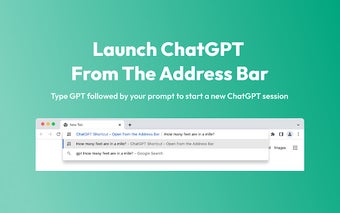
With ChatGPT Shortcut - Open from the Address Bar, users can easily initiate a ChatGPT session by simply typing 'GPT' followed by their prompt in the address bar. This shortcut provides a quick and convenient way to access ChatGPT from anywhere within the browser.
To use this extension, users need to follow a few simple steps. First, they need to install the ChatGPT Shortcut - Open from the Address Bar extension. Next, they can log into ChatGPT using their browser or create a free account if they don't have one. Once installed and logged in, users can type 'GPT' in the address bar, followed by their prompt. Pressing enter will open a new tab with ChatGPT and the prompt automatically filled in.
It's important to note that this extension is completely free and does not require any account or sign-in. Additionally, it does not store any user data, ensuring privacy and security.
Overall, ChatGPT Shortcut - Open from the Address Bar provides a convenient way to access ChatGPT directly from the address bar, making it easier and quicker to start new ChatGPT conversations within the browser.